Your ideas, embroidered.
Hoopy turns photos, drawings, logos and lettering into designs ready for your embroidery machine. On your phone, in a few taps.
Opening, resizing and converting embroidery files is always free, no account needed.
New: “Enhance with AI”
Now you can embroider anything.
One tap, and your photo becomes a drawing that's perfect to embroider. The dog photographed in the garden, the logo on a creased T-shirt, your daughter's drawing on a folded sheet: Hoopy redraws them clean, in their own colours, solid and crisp. Ready for your machine.
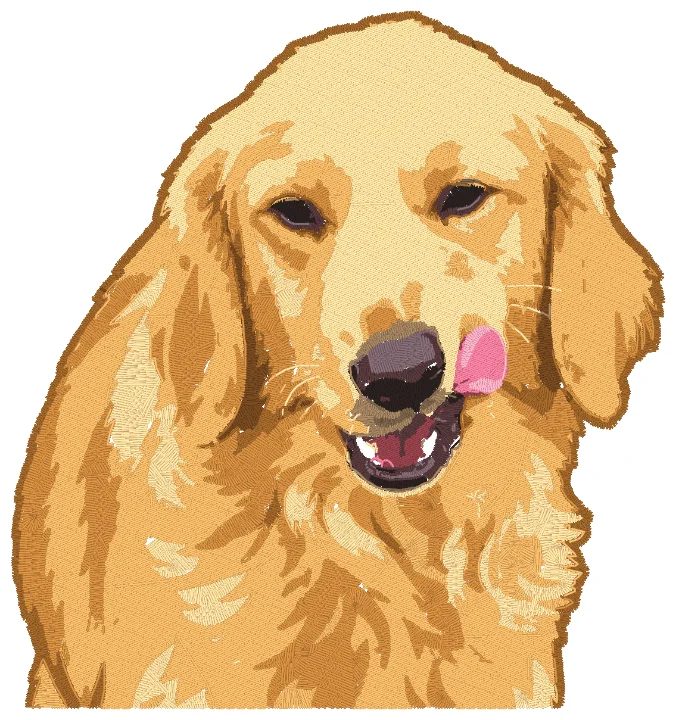
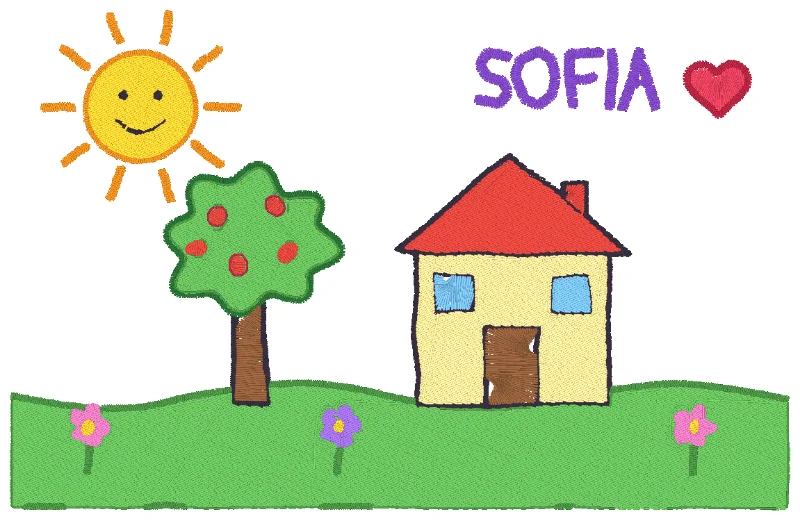
And your machine stitches it like this.
These are the designs Hoopy makes from the enhanced drawings: stitch by stitch, in your machine's format.
-
Pick the photo
Your dog, your shop's logo, the kids' drawing: from the gallery or the camera.
-
Tap “Enhance with AI”
Choose “No background” or “The whole photo”. In about twenty seconds the drawing is ready.
-
Embroider it
Place it on the hoop, watch it stitch and save the file for your machine.
Try the magic on your own photo.
“Enhance with AI” comes with every plan, for people aged 18 and over: 2 photos in total with the 7-day plan, 10 photos a month with the 1-month plan, 20 with the 6-month plan and, with the 12-month plan, no monthly limit; always 6 a day, and each photo can be enhanced only once. The photo you enhance goes to our AI provider, and Hoopy doesn't keep it. See how.
From idea to embroidery in four steps
No desktop software, no digitizing to learn. Hoopy asks one thing at a time, and every question already has a sensible answer.
-
Pick a starting point
A photo or a drawing from your gallery, an embroidery file you already have, or a name typed in one of your fonts.
-
Prepare the design
Remove the background and check the threads Hoopy found: tap one to drop it. Then choose your machine's brand and hoop.
-
Place it in the hoop
Move, rotate and resize on a hoop just like the real one, with a grid and a 3D view. Add lettering and geometric shapes. If it runs outside the embroidery area, Hoopy tells you and fits it back in.
-
Watch it stitch, then save it
Watch the design stitched out one stitch at a time, the way your machine will sew it. Then the file comes out in its format, already picked: save it on your phone or send it wherever you need.
- Your kid's drawing
- Your shop's logo
- A name on a bib
- A star or a heart, from the shapes
- A photo of your dog
- A .pes you already have
Watch it stitch before you create it.
In the hoop, tap the sewing machine: Hoopy shows you the design stitched out one stitch at a time, thread after thread, in the order your machine will sew it. Watching costs nothing: a design only counts when you save or share the file.
- Just like a videoPause it and play it, drag the bar forward and back, and if you're in a hurry make it up to eight times faster.
- Raised or flatThe threads in 3D, as on the fabric, or in 2D, to follow every stitch.
- You choose the thread orderHoopy puts the threads in an order that works. If you'd like another, drag a thread up or down in the colour list: the design is redone right away, and the preview stitches it that way.
It speaks your machine's language
Seven formats for the most popular brands. When you export, the one your machine needs is already selected.
- PESBrother and Baby Lock
- JEFJanome and Elna
- EXPBernina, with its colour file
- VP3Husqvarna Viking and Pfaff
- XXXSinger
- ZHSNecchi
- DSTTajima and nearly every machine, industrial ones included
Already have an embroidery file?
Open it in Hoopy and see it in the hoop. Resize it and the stitches are recalculated for the new size, or convert it to another format. It's free, no account needed.
Free to start. A plan when you stitch more.
You only pay for a project with new elements, one design at a time. Everything else you can change whenever you like.
Without paying a thing
-
Always free
All your embroidery files
Open, view, resize and convert the embroidery files you already have. No account needed.
-
Welcome
3 designs on us
Sign in with Apple or Google and create your first three designs, no subscription needed.
With a plan
-
7 days
5 new designs
and “Enhance with AI” (18 and over): 2 photos in total
For one specific project. Doesn't renew.
-
1 month
30 new designs a month
and “Enhance with AI” (18 and over): 10 photos a month, 6 a day
Renews monthly; cancel from the store whenever you like.
-
6 months
60 new designs a month
and “Enhance with AI” (18 and over): 20 photos a month, 6 a day
Six months, counted from the day you start. Renews every 6 months.
-
12 months
Unlimited designs, up to 6 a day
and “Enhance with AI” (18 and over): no monthly limit on photos, 6 a day
All year round, counted from the day you start. Renews yearly.
-
Top-up +10
10 extra designs that never expire
For when you already have a plan: they're used after your period's designs, even beyond 6 a day, and stay yours when your plan ends.
What counts as a design
A design is a project you save or share with new elements in it: pictures, lettering or shapes, as many as you like, count as a single design. Changing the size, fabric, format, colours or threads, or editing the pictures already in it, costs nothing, today or a year from now, and exporting a design you've already made again is free forever, on every phone on your account. If you add a new element to a project you've already saved, the next save uses another design, just one.
A picture, “Emma” and a heart in the same hoop are just one design. With a plan you can create up to 6 new designs a day, and more with top-ups. You're free to sell what you embroider, on any plan; the files themselves are for personal use.
You'll find the prices in the app, exactly as the store shows them.
Your photos stay yours.
The embroidery engine runs on your phone, even offline. Hoopy's cloud gets the design count, never your email. A photo only leaves your phone if you choose to enhance it with AI, and we don't keep it.
On your phone
- Photos, drawings and logosHoopy reads them and stitches them right there. Only the photo you enhance with AI leaves.
- Projects, fonts and filesAll your work, saved on your phone only.
- Your emailIf you sign in, you'll see it in your profile. It stays on the phone.
Only the count is kept
In Hoopy's cloud
- An anonymous IDA random code that says nothing about you.
- A fingerprint of your sign-inA code derived from your Apple or Google sign-in, not your email.
- Your design countHow many you've made and which ones you've paid for, recognised by a fingerprint of the content, not the picture.
- Your AI photo countHow many you've enhanced, for the plan's limits: not the photos.
Purchases go through Apple and Google only, and the account data lives on Cloudflare servers, with the database in the European Union. If you use “Enhance with AI”, the photo you pick goes to the AI provider OpenRouter, in the United States, which has it drawn by OpenAI or, if OpenAI has a failure, by Black Forest Labs. You can delete your account from the app whenever you like. Read the privacy policy.
Questions
What is “Enhance with AI”?
It's what's new in every plan. Pick a photo, tap “Enhance with AI” and an AI redraws it as a clean drawing, with its own colours and with or without the background: it's easier to embroider. You get 2 photos in total with the 7-day plan, 10 a month with the 1-month plan, 20 with the 6-month plan and no monthly limit with the 12-month plan; always 6 a day, from age 18. Only the photo you enhance leaves your phone: it goes to our AI provider, and we don't keep it.
Will it work with my machine?
If your machine reads PES, JEF, EXP, VP3, XXX, ZHS or DST, yes. Hoopy knows the hoops of Brother and Baby Lock, Janome and Elna, Bernina, Husqvarna Viking and Pfaff, Singer, Necchi and industrial machines (Tajima, Barudan, Melco, ZSK).
Do I need an account?
No. Opening, resizing and converting files needs nothing at all. Signing in with Apple or Google gets you the 3 welcome designs and brings your plan and paid designs to any other phone. No email, no password.
Do I need an internet connection?
Only to create a new design: when you save or share it, Hoopy counts it with the cloud, and a moment online is enough. Preparing the picture, opening, converting and downloading again the designs you've already created always works, even offline.
Can I sell what I embroider?
Yes: you can sell embroidered items on any plan. The files you create are for personal use, though, and can't be shared or sold.
How do I cancel a subscription?
From your Apple or Google account settings, like any other store subscription. Your plan stays active until the end of the period you've paid for.
Can I send the file to my machine over Wi-Fi?
Not yet. For now you save it on your phone or share it, then take it to your machine the way you usually do.
Which languages is Hoopy in?
English and Italian.
Your first design is just a few taps away.
Hoopy is on the App Store and on Google Play. Your first three designs are on us.